Tampilkan postingan dengan label Trick and Tips. Tampilkan semua postingan

Sabtu, 07 Maret 2015

LG Mobile Secret Codes

LG Mobile Phone Secret Codes

LG all models test mode:

  • Type 2945#*# on the main screen.
  • 2945*#01*# Secret menu for LG
  • IMEI and SW (LG 510): *#07#
  • Software version (LG B1200): *8375#
  • Recount cheksum (LG B1200): *6861# 
  • Factory test (B1200): #PWR 668 
  • Simlock menu (LG B1200): 1945#*5101# 
  • Simlock menu (LG 510W, 5200): 2945#*5101#
  • Simlock menu (LG 7020, 7010): 2945#*70001# 
  • Simlock menu (LG 500, 600): 2947#*

LG-U81XX SPECIAL CODES:

Code to read phone version : 

- Phone without SIM
- Enter 277634#*# or 47328545454#
- Select 'SW Ver.info'

Code to reset phone : 

- Phone without SIM
- Enter 277634#*# or 47328545454#
- Select 'Factory Reset'

Code to enter UNLOCK MENU : 

- Phone wit SIM inside
- Enter 2945#*88110#
Test Menu 8330 : 637664#*#
Test Menu 8180 V10a: 49857465454#
Test Menu 8180 V11a: 492662464663#
Test Menu 8130-8138: 47328545454#
Test Menu 8110-8120: 277634#*

Jumat, 06 Maret 2015

How to Receive Payments from Adsense with Payoneer

How to Receive Payments from Adsense with Payoneer

 Adsense is, to date, the best alternative to make money with our sites or blogs via contextual advertising. The adsense payment system gives the option to receive monthly income through bank transfer, Western Union or by sending checks. In this resource I want to share, we will use the first option "Bank Transfer".

Thanks to a new option to receive payments through affiliates is to service Payoneer (know that payoneer you pay $ 25 to apply for your service!), Which allows us to collect money, send it to your bank account in the United States - created for them on your behalf - and withdraw the money to Payoneer prepaid MasterCard card.

One of the restrictions Adsense payment system is not for all countries and allowed users to receive payments by bank transfer, but it already has a solution. Careful when applying the method!

The first thing you need is your Payoneer account, even if you can not apply through the official site

The second step is to create a physical address in the USA by registering your account USABox.com . This is the address that we will use in our Adsense account - you should have the choice to change direction -

As Adsense confirms the PIN and the account through a telephone number that you must enter the account, and as we are entering an address USA so we can receive transfer payments , here we will make some investment and we will use Skype service to hire a real phone number within the United States on our behalf . From their website you can buy the phone number.

We headed to our Adsense account and we use data obtained previously and hopefully address the call by the number of Skype to confirm the PIN takes to reach both by regular mail to the Latin countries .

We have everything ready , now just need to wait payments reaching Payoneer account and you can withdraw the card at any ATM Mastercard for your country!

Sabtu, 10 Januari 2015

Secret Codes For Your Android Mobile

Hai friends, here is a wide collection of secret codes for your mobile with Android OS. These codes enables you to access the hidden options which are not shown by default on your device, and can be used for testing the functions of various utilities used by your mobile.

Note: We Cannot guaranty that these codes will work on all Android mobiles!

Previous Articles:
These codes are used only by technicians, So be careful with them and use it at your own risk. Press "Ctrl+D" for Future Use! :)

General Codes:


*#06# – To Display's IMEI number.

*2767*3855# – To format your device i.e To delete everything on the phone memory (Can be customized).

*#*#4636#*#* – This code will display your usage statistics and battery.

*#*#273282*255*663282*#*#* – This code helps you to back up all media files on your mobile.

*#*#197328640#*#* – This code will send you to the test mode, to test various functionality of your mobile.

*#*#1111#*#* – This code will display FTA software version.

*#*#1234#*#* – This code will show PDA and firmware version.

*#*#232339#*#* – For wireless LAN tests.

*#*#0842#*#* – This code is used  for Backlight/vibration test.

*#12580*369# – Display's Software and hardware info.

*#*#2664#*#* – This code is used for Testing the touchscreen.

*#9900# – System dump mode.

*#9090# – Diagnostic configuration.

*#*#34971539#*#* – Will display Detailed camera information.

*#872564# – USB logging control.

*#301279# – HSDPA/HSUPA Control Menu.

*#7465625# – This code will display phone's lock status.

*#0*# – This code will enable you to enter the service menu on newer phones like Galaxy S III.

*#*#7780#*#* – Reset the /data partition to factory state.


Basic Codes:

*#*#7780#*#*   - This code is used for factory restore setting.This will remove Google account setting and System and application data and settings.

*2767*3855#   -  This code is used for factory format, and will remove all files and settings including the internal memory storage. It will also re install the firmware.

*#*#4636#*#*   - This code show information about your phone and battery.

*#*#273283*255*663282*#*#*    - This code opens a File copy screen where you can backup your media files e.g. Images, Sound, Video and Voice memo.

*#*#197328640#*#*    -  This code can be used to enter into Service mode. You can run various tests and change settings in the service mode.

*#*#7594#*#*   -  This code enable your "End call / Power" button into direct power off button without asking for selecting any option(silent mode, aero plane and power-off).

*#*#8255#*#*  -  This code can be used to launch G Talk Service Monitor.

*#*#34971539#*#*    -  This code is used to get camera information. Please avoid update camera firmware option.

W-LAN, GPS and Bluetooth Test Codes:

*#*#232339#*#* OR *#*#526#*#* OR *#*#528#*#*   -  W-LAN test (Use “Menu” button to start various tests).

*#*#232338#*#*    -  Shows WiFi MAC address.

*#*#1472365#*#*    -  GPS test.

*#*#1575#*#*    -  Another GPS test.

*#*#232331#*#*   -  Bluetooth test.

*#*#232337#*#    -  Shows Bluetooth device address.

Codes to launch various Factory Tests:

*#*#0842#*#*   - Device test (Vibration test and BackLight test).

*#*#0588#*#*    - Proximity sensor test.

*#*#0*#*#*    -  LCD test.

*#*#2664#*#*   -  Touch screen test.

*#*#2663#*#*    -  Touch screen version.

*#*#0283#*#*   -  Packet Loopback.

*#*#0673#*#* OR *#*#0289#*#*    -  Melody test.

*#*#3264#*#*    -  RAM version.

Code for firmware version information:

 *#*#1111#*#*   -  FTA SW Version.

*#*#2222#*#*   - FTA HW Version.

*#*#44336#*#* - PDA, Phone, CSC, Build Time, Changelist number.

*#*#4986*2650468#*#*   - PDA, Phone, H/W, RFCallDate.

*#*#1234#*#*  - PDA and Phone.

Jumat, 09 Januari 2015

Colorful Texts In Facebook Chat

Colorful Texts In Facebook Chat

Recently I found new tricks , Its is really Impressive , You Can Send Colorful Texts in chat , but its quite difficult cos first you have to set all codes but It is Amazing I have tried and its look Cool , And In Group Chat I Got many Girls Friend Request . Try It...........


Codes are Below with Their Alphabets

Hello - Try This Copy & Past Below code in Chat box For Hello
[[111356865552629]] [[115430438474268]] [[115807951764667]] [[115807951764667]] [[116564658357124]]

FBSX
[[109225112442557]] [[116067591741123]] [[115927268419031]] [[116740548336581]]


[[107015582669715]] = A

[[116067591741123]] = B

[[115602405121532]] = C

[[112542438763744]] = D

[[115430438474268]] = E

[[109225112442557]] = F

[[111532845537326]] = G

[[111356865552629]] = H

[[109294689102123]] = I

[[126362660720793]] = J

[[116651741681944]] = K

[[115807951764667]] = L

[[106596672714242]] = M

[[108634132504932]] = N

[[116564658357124]] = O

[[111669128857397]] = P

[[107061805996548]] = Q

[[106699962703083]] = R

[[115927268419031]] = S

[[112669162092780]] = T

[[108983579135532]] = U

[[107023745999320]] = V

[[106678406038354]] = W

[[116740548336581]] = X

[[112416755444217]] = Y

[[165724910215]]       = Z

Send SMS from Facebook Free

Instant messaging service is at your finger tip for free!!! Now you can send SMS across globe to any mobile through your favorite social networking site, FACEBOOK. Till now we were using our mobiles to send sms, but now you can send through Facebook too using an application called "ChatSMS" which allows you to send free sms to any mobile across globe and that to FREE ! FREE !! FREE !!!


 An application in Facebook "ChatSMS" is one app that has text messaging trick to any country . To know how to send free sms from Facebook, follow the steps mentioned below:


  1. Login to your Facebook account.
  2. Type http://apps.facebook.com/chatsms/ in your browser and grant the permission for accessing the application.
  3. In the displayed screen , you just have to type your country , the mobile number of the person whom you want to send the sms and the text to send. 
Send Free SMS to any mobile from facebook

The only restriction of this application is you can only send 4 sms per day and 100 characters  is the limit of the text message. Other that these points, it works well for sending sms to any country , to any mobile, for free.


So how is this trick. I am sure you will definitely use this interesting app for your benefits.

Sabtu, 23 November 2013

Get Facebook Likes twitter, Youtube etc

Get Free LIKES, Follower, Viewer, Website Hits
Just Sign Up with this Link:

Sign up Here
 
      Facebook Likes
      Facebook Share
      Facebook Followers
      Facebook Post Like
      FB Post Share
      Google Circles
      YouTube Subscribe
      YouTube Likes
      YouTube Favorites
      Twitter Followers
      Twitter Tweets
      Twitter Retweets
      Twitter Favorites
      Website Hits

    Kamis, 21 November 2013

    Get Google Adsense Account Approved


    Getting an Google Adsense account is not so easy, even it took me a long time to get it and to become a successful Blogger. If you want to be a successful blogger and want to get a Google Adsense account through your website or blog, then you need to be guided by a experienced person.

    I remember that i was too much tensed when i was not able to get my Google Adsense account, but after a lots of efforts i got it. Since there was no one to guide me, it took me a long time to get it.

    So today i thought to reveal the untold secrets of getting Google Adsense Account Approved. First i would like to clear that don't think so that you will get the AdSense very easily, you must know that blogging requires patience. Even it took me 15 months to get it but with the help of the tips provided below, i think you will get your Adsense Account approved easily and more quickly. 


    These are the requirements or you can say guidelines which will help you out a lot to get your Google Adsense Account Approved quickly:
    • Your website must be a top-level domain because it is too difficult to get an Adsense account approved for sub-level domains.
              Example: It should be www.yoursite.com instead of www.yoursite.blogspot.com
    • Before you apply for Adsense, your domain must have been active for at least 6 months. These 6 months are basically to increase your website traffic and to post interesting articles.
    • Website Traffic is one of the most important thing. The more the traffic, the more the chances of getting Adsense approved. At least 50 unique views per day must be there, otherwise there is no use of getting it approved.
    • Only post Original Contents, don't copy any content (article) from any other website or source. Always try to write interesting articles, so that the user gets interested to read it. In comparison of pictures and videos, Google Adsense likes content more. At least post original 50-60 articles before applying for Google Adsense.
    • Private details provided during the Google Adsense registration should match to the details provided to the domain provider at the time of registration. Thus, the details provided should be accurate.

    Rabu, 13 November 2013

    1000 Hacking Tutorials


    Download this 1000 hacking tutorial Ebook 
    This is Free.......................


    http://www.tusfiles.net/rf0jlr264l2b

    Rabu, 03 Juli 2013

    Advantages And Disadvantages of Windows 8

    Advantages And Weakness of Windows 8 | Before using the operating system on this one, it is better you to understand all the advantages and disadvantages of Windows 8 operating system which is the latest. Here I will discuss a little pros and cons of Windows 8.


    Advantages And Disadvantages of Windows 8

    Advantages / Pros:

    1. Optimized for the touch screen
    Windows 8, the interface dubbed Metro, is really optimized for touch interface with Windows Phone style form.


    2. Supports ARM chip
    Windows 8 supports devices using ARM chips infrastructure. It is expected to extend the reach of Windows 8 in the tablet arena, given that most currently available tablets using ARM chips.

    3. Having a short boot time
    Windows 8 Boot in the demo only lasts 8 seconds. A much shorter time than in previous versions of Windows booting.


    4. Windows 8 does not require a PC upgrade
    Microsoft says a computer that can run Windows 7 can also run Windows 8 so that the users do not need to upgrade your PC. According to Microsoft, Intel Atom processor and 1 GB of RAM is enough to run this OS

    5. Windows Store app store
    Windows 8 will have its own application store called Windows Store. Windows Store provides a wide range of applications that are optimized for Windows 8.

    6. Supports NFC (Near Field Communications)

    Windows 8 will support NFC, a technology that their role, among others for financial transactions digitally. Windows 8 tablet taking was likely to automatically include this feature.


    Disadvantages / Cons:

    1. Overlap between Metro UI and Aero UI.
    Developers find the constant change that occurs between the tile-based Metro UI and glassy Aero UI. It is considered unreasonable and very confusing. Switching from Metro applications and desktop applications is very difficult.

    2. There is no option to turn tiles into icons.
    The smallest size of the tiles, zoom is still too big. When we install a lot of applications will then screen the Metro will look chaotic.

    3. It is difficult to move between screens.
    The absence of such a function Alt-Tab while working with the desktop and keyboard to switch from one app to another app might be a very difficult thing. Instead, on the Windows 8 Metro UI we can not use the pointer or finder to put the screen on the left side and drag. It sounds so trivial, but problems will arise when we are working with many applications. There is no quick and easy way to switch between applications. If you move the mouse to the left then the icon will pops up. And if it is not right then we have to click several times, or try again.


    4. Metro multitasking.
    If my friend uses Metro application (for tablets) in Windows 8, the screen will display two applications are lined. For starters it would not be a big deal. But for advanced users, the ability of Metro to multitasking just for the two applications is a fatal weakness.

    5. Metro.

    Metro is able to work well on tablets but the UI is not very compatible when used on the desktop. Hard to do for my friend who use Notebook. So that by default Windows 8 could not boot to the Metro UI. In other words, Microsoft needs to provide kill-switch to turn off the Metro UI.

    6. Flash content on the Tablet PC.
    Apparently Microsoft is deliberately making Windows 8 can not support Flash content on Tablet PC. The reason Microsoft is doing this is to save battery Tablet. It also can protect our privacy and enhance security Tablet. This is because in some applications, and other electronic devices, the use of Flash content even cause data damage or crash.


    SHARE With Your FRIEND....
    ENjOY!!!

    Rabu, 19 Juni 2013

    How To Get Someone’s Ip Address Through Facebook


    NetOopsblog protected image
    Hello Friends ! Today i am going to post the trick for getting someone’s Ip through Facebook.

    Step 1 – First invite or ping that person for a chat on facebook .


    Step 2 – Make sure your all other tabs in browser and other services in computer are closed. If Possible for you then delete all the cookies-cache and browsing history from your browser.
    Step 3 – While chatting on Facebook go to Start >- Run >- cmd .
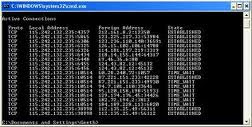
    Step 4 – After Opening command Prompt Type  netstat -an command and hit Enter.
    Step 5 – Now you will get Ip Address of all the established connections there
    Step 6 – Note all the suspicious Ip’s and trace user using ip address tracer sites like whatismyip or ipmango.com .
    Thats It !
    You can use same trick for tracing ip of someone’s on Skype, gtalk and Yahoo Messenger .

    Selasa, 18 Juni 2013

    Make Facebook Status Blue


    This is one of the coolest Facebook tricks because it not only makes your status update change color, but it also turns it into a link where does the link lead you ask? It leads to the profile page of the person who clicked it, so you can actually troll your friends with this trick.

    Step 1

    Write the following line in your status update:
    @@[1:[0:1: write here ]]

    Step 2

    Replace the write here text with any text you wish to become blue. You can add more text before or after the code, to make this look even cooler.

    Step 3

    Post the Facebook status :)

    Speed-up Your Internet Connection in Windows 7/Xp /vista


    When we use Windows 7/vista/xp it doesn't give us full bandwidth speed as it has to maintain OS IDLE MODE. This idle mode is also applicable for processor, RAM, Audio & Video processing units to comfort a user but using or applying  some tricks we can do it very simply.
    Today we are going to know how to modify the idle or limit mode of bandwidth without doing any harm to Windows OS.
    It's a normal trick by using Group Policy Editor or gpedit. Just follow the steps.....

    1. Go to Start>run to run a command.
    2. In run type gpedit.msc and hit enter or click ok. The Group Policy Editor window will open if you have the sufficient privilege on the computer.

    Start>run>gpedit.msc


         3.  In Group Policy Editor window select Computer Configuration in the left side and expand the Administrative Template array sign.
         4.Under the Administrative Template expand Network and select QoS Packet Scheduler.
         5. After selecting QoS Packet Scheduler some settings will be shown in the right side and select Limit reservable bandwidth.
     Administrative Template>Network>QoS Packet Scheduler

         6. To modify this setting double click on Limit reservable bandwidth and get the properties of that.
         7. By default it is not configured (not configured or default value is 20%). So Enable it from option and decrease the value to 0%.
    Enable Limit reservable bandwidth to 0%

         8. Then apply this setting and complete it clicking ok. You have to restart your internet connection.
    That's all. Enjoy a full speed internet connection which is provided by your ISP.
     
    EnjoY!!!!!

    Rabu, 10 April 2013

    Window Shortcut Key Trick

    Window Shortcut  Key Trick

    Shortcuts                                   Function

    • ALT+ENTER                  = View properties for the selected
    • ALT+ESC                         =Cycle through items in the order they were opened
    • ALT+F4                             =Close the active item, or program
    • ALT+SPACEBAR             =show the System menu for the active window
    • ALT+TAB                          =Switch between open items
    • ALT+Underlined letter = Display the corresponding menu
    • BACKSPACE                    =View the folder one level up in My Computer o
    • CTRL+A                           =Select all
    • CTRL+B                           =Bold
    • CTRL+C                           =Copy
    • CTRL+I                            =Italics
    • CTRL+O                           =Open an item
    • CTRL+U                           =Underline
    • CTRL+V                           =Paste
    • CTRL+X                           = Cut
    • CTRL+Z                            = Undo
    • CTRL+F4                          = Close the active document
    • CTRL                                 =while dragging Copy selected item
    • CTRL+SHIFT                = while dragging Create shortcut to selected item
    • CTRL+RIGHT ARROW  =Move the insertion point to the beginning of the next word
    • CTRL+LEFT ARROW   =Move the insertion point to the beginning of the previous word
    • CTRL+DOWN ARROW  =Move the insertion point to the beginning of the next paragraph
    • CTRL+UP ARROW       = Move the insertion point to the beginning of the                                                
    • SHIFT+DELETE          =Delete file  permanently without moving to recycle bin
    • ESC                                   = Cancel the current task
    • F1                                      =  Help
    • F2                                     = Rename selected item
    • F3                                     = Search for a file or folder
    • F4                                     =show the Address bar list in  Windows Explorer
    • F5                                     = Refresh the active window
    • F6                                     =Cycle through screen elements in a window
    • F10                                  = Activate the menu bar in the active program
    • SHIFT+F10                  = Display the shortcut menu for the selected item
    • CTRL+ESC                     =Display the Start menu
    • SHIFT+CTRL+ESC     =Launches Task Manager
    • SHIFT                              =To Prevent the CD from automatically playing
    • WIN                                =Display or hide the Start menu
    • WIN+BREAK              =Display the System Properties dialog box
    • WIN+D                 = Minimizes all Windows and shows the Desktop
    • WIN+E                          =Open Windows Explorer
    • WIN+F                          =Search for a file or folder
    • WIN+F+CTRL             =Search for computers
    • WIN+L                          =Locks the desktop
    • WIN+M                        =Minimize or restore all windows
    • WIN+R                         =Open the Run dialog box
    • WIN+TAB                    =Switch between open items 

    Windows Run Commands Trick

    Program
    Run Command
    Accessibility Controls
    access.cpl
    Accessibility Wizard
    accwiz
    Add Hardware Wizard
    hdwwiz.cpl
    Add/Remove Programs
    appwiz.cpl
    Administrative Tools
    control admintools
    Adobe Acrobat ( if installed )
    acrobat
    Adobe Distiller ( if installed )
    acrodist
    Adobe ImageReady ( if installed )
    imageready
    Adobe Photoshop ( if installed )
    photoshop
    Automatic Updates
    wuaucpl.cpl
    Basic Media Player
    mplay32
    Bluetooth Transfer Wizard
    fsquirt
    Calculator
    calc
    Ccleaner ( if installed )
    ccleaner
    C: Drive
    c:
    Certificate Manager
    cdrtmgr.msc
    Character Map
    charmap
    Check Disk Utility
    chkdsk
    Chrome ( if installed )
    chrome
    Clipboard Viewer
    clipbrd
    Command Prompt
    cmd
    Command Prompt
    command
    Component Services
    dcomcnfg
    Computer Management
    compmgmt.msc
    Compare Files
    comp
    Control Panel
    control
    Create a shared folder Wizard
    shrpubw
    Date and Time Properties
    timedate.cpl
    DDE Shares
    ddeshare
    Device Manager
    devmgmt.msc
    Direct X Control Panel ( if installed )
    directx.cpl
    Direct X Troubleshooter
    dxdiag
    Disk Cleanup Utility
    cleanmgr
    Disk Defragment
    dfrg.msc
    Disk Partition Manager
    diskmgmt.msc
    Display Properties
    control desktop
    Display Properties
    desk.cpl
    Display Properties (w/Appearance Tab Preselected )
    control color
    Dr. Watson System Troubleshooting Utility
    drwtsn32
    Driver Verifier Utility
    verifier
    Ethereal ( if installed ) 
    ethereal
    Event Viewer
    eventvwr.msc
    Files and Settings Transfer Tool
    migwiz
    File Signature Verification Tool
    sigverif
    Findfast
    findfast.cpl
    Firefox
    firefox
    Folders Properties
    control folders
    Fonts
    fonts
    Fonts Folder
    fonts
    Free Cell Card Game
    freecell
    Game Controllers
    joy.cpl
    Group Policy Editor ( xp pro )
    gpedit.msc
    Hearts Card Game
    mshearts
    Help and Support
    helpctr
    Hyperterminal
    hypertrm
    Hotline Client
    hotlineclient
    Iexpress Wizard
    iexpress
    Indexing Service
    ciadv.msc
    Internet Connection Wizard
    icwonn1
    Internet Properties
    inetcpl.cpl
    Internet Setup Wizard
    inetwiz
    IP Configuration (Display Connection Configuration)
    ipconfig /all
    IP Configuration (Display DNS Cache Contents)
    ipconfig /displaydns
    IP Configuration (Delete DNS Cache Contents)
    ipconfig /flushdns
    IP Configuration (Release All Connections)
    ipconfig /release
    IP Configuration (Renew All Connections)
    ipconfig /renew
    IP Configuration (Refreshes DHCP & Re-Registers DNS)
    ipconfig /registerdns
    IP Configuration (Display DHCP Class ID)
    ipconfig /showclassid
    IP Configuration (Modifies DHCP Class ID)
    ipconfig /setclassid
    Java Control Panel ( if installed )
    jpicpl32.cpl
    Java Control Panel ( if installed )
    javaws
    Keyboard Properties
    control keyboard
    Local Security Settings
    secpol.msc
    Local Users and Groups
    lusrmgr.msc
    Logs You Out of Windows
    logoff
    Malicious Software Removal Tool
    mrt
    Microsoft Access ( if installed )
    access.cpl
    Microsoft Chat
    winchat
    Microsoft Excel ( if installed )
    excel
    Microsoft Diskpart
    diskpart
    Microsoft Frontpage ( if installed )
    frontpg
    Microsoft Movie Maker
    moviemk
    Microsoft Management Console
    mmc
    Microsoft Narrator
    narrator
    Microsoft Paint
    mspaint
    Microsoft Powerpoint
    powerpnt
    Microsoft Word ( if installed )
    winword
    Microsoft Syncronization Tool
    mobsync
    Minesweeper Game
    winmine
    Mouse Properties
    control mouse
    Mouse Properties
    main.cpl
    MS-Dos Editor
    edit
    MS-Dos FTP
    ftp
    Nero ( if installed )
    nero
    Netmeeting
    conf
    Network Connections
    control netconnections
    Network Connections
    ncpa.cpl
    Network Setup Wizard
    netsetup.cpl
    Notepad
    notepad
    Nview Desktop Manager ( if installed )
    nvtuicpl.cpl
    Object Packager
    packager
    ODBC Data Source Administrator
    odbccp32
    ODBC Data Source Administrator
    odbccp32.cpl
    On Screen Keyboard
    osk
    Opens AC3 Filter ( if installed )
    ac3filter.cpl
    Outlook Express
    msimn
    Paint
    pbrush
    Password Properties
    password.cpl
    Performance Monitor
    perfmon.msc
    Performance Monitor
    perfmon
    Phone and Modem Options
    telephon.cpl
    Phone Dialer
    dialer
    Pinball Game
    pinball
    Power Configuration
    powercfg.cpl
    Printers and Faxes
    control printers
    Printers Folder
    printers
    Private Characters Editor
    eudcedit
    Quicktime ( if installed )
    quicktime.cpl
    Quicktime Player ( if installed )
    quicktimeplayer
    Real Player ( if installed )
    realplay
    Regional Settings
    intl.cpl
    Registry Editor
    regedit
    Registry Editor
    regedit32
    Remote Access Phonebook
    rasphone
    Remote Desktop
    mstsc
    Removable Storage
    ntmsmgr.msc
    Removable Storage Operator Requests
    ntmsoprq.msc
    Resultant Set of Policy ( xp pro )
    rsop.msc
    Scanners and Cameras
    sticpl.cpl
    Scheduled Tasks
    control schedtasks
    Security Center
    wscui.cpl
    Services
    services.msc
    Shared Folders
    fsmgmt.msc
    Sharing Session
    rtcshare
    Shuts Down Windows
    shutdown
    Sounds Recorder
    sndrec32
    Sounds and Audio
    mmsys.cpl
    Spider Solitare Card Game
    spider
    SQL Client Configuration
    clicongf
    System Configuration Editor
    sysedit
    System Configuration Utility
    msconfig
    System File Checker Utility ( Scan Immediately )
    sfc /scannow
    System File Checker Utility ( Scan Once At Next Boot )
    sfc /scanonce
    System File Checker Utility ( Scan On Every Boot )
    sfc /scanboot
    System File Checker Utility ( Return to Default Settings)
    sfc /revert
    System File Checker Utility ( Purge File Cache )
    sfc /purgecache
    System File Checker Utility ( Set Cache Size to Size x )
    sfc /cachesize=x
    System Information
    msinfo32
    System Properties
    sysdm.cpl
    taskmgr
    TCP Tester
    tcptest
    Telnet Client
    telnet
    Tweak UI ( if installed )
    tweakui
    User Account Management
    nusrmgr.cpl
    Utility Manager
    utilman
    Volume Serial Number for C:
    label
    Volume Control
    sndvol32
    Windows Address Book
    wab
    Windows Address Book Import Utility
    wabmig
    Windows Backup Utility ( if installed )
    ntbackup
    Windows Explorer
    explorer
    Windows Firewall
    firewall.cpl
    Windows Installer Details
    msiexec
    Windows Magnifier
    magnify
    Windows Management Infrastructure
    wmimgmt.msc
    Windows Media Player
    wmplayer
    Windows Messenger
    msnsgs
    Windows Picture Import Wizard (Need camera connected)
    wiaacmgr
    Windows System Security Tool
    syskey
    Windows Script host settings
    wscript
    Widnows Update Launches
    wupdmgr
    Windows Version ( shows your windows version )
    winver
    Windows XP Tour Wizard
    tourstart
    Wordpad
    write
    Zoom Utility
    igfxzoom